How to Stream NATS Messages to ClickHouse in Real Time

Not everything that moves over NATS belongs in an analytical database — request/reply calls, control-plane commands, and service coordination do their work in flight or in a JetStream stream. But some subjects carry events with a second life as data: signups, orders, telemetry, operational signals. JetStream can persist and replay those streams; what it isn’t is a place to run aggregations over six months of them.
For dashboards, product analytics, and operational monitoring, the events also need to land in a store built for that kind of query. The usual answer is a custom consumer service or a nightly ETL job that batches data into an analytical database. Both add a moving part you have to run and monitor.
ClickHouse removes that layer. It ships a native NATS table engine that subscribes to subjects directly and writes rows into a MergeTree table through a materialized view. No connector service. No Kafka Connect cluster. No intermediate ETL.
This post walks through the whole pattern against a local NATS server: core NATS ingestion, JetStream ingestion with a durable consumer, the materialized view that ties everything to storage, and the production settings worth knowing before you ship it. A short section at the end shows the one change needed to run the same pipeline against managed NATS on Synadia Cloud.
How the ClickHouse NATS engine works
The integration has three parts. In the order data flows through them:
1. A table with ENGINE = NATS — the subscription. It connects to NATS, subscribes to one or more subjects, and exposes incoming messages as rows. It queues messages rather than storing them: each message can be read once, and a direct SELECT against it is only useful for smoke tests. In steady state, nothing reads from it manually.
2. A materialized view — the pump. In ClickHouse, a materialized view is a trigger that runs an INSERT SELECT whenever new rows arrive in its source table. Attach one to the NATS engine table and ClickHouse starts consuming in the background, transforming each batch of rows and writing it to the destination.
3. A destination table — the store. Typically MergeTree, the standard ClickHouse table engine for analytical workloads: it stores data on disk in sorted, compressed parts and is the target for almost every OLAP query you’ll write. This is the only piece that holds data, and the only one your dashboards and queries should touch.

A single NATS engine table can feed multiple materialized views, so you can fan out the same subject into a raw table, a per-minute rollup, and a filtered error stream from one subscription. The engine accepts subject wildcards (orders.*.created, telemetry.>), which means one subscription can span an entire subject hierarchy.
One thing to know before the walkthrough: you create the pieces in roughly the reverse of flow order — store first, then subscription, then the pump — because the materialized view can’t exist until the tables on both ends of it do. The steps below follow that build order.
Prerequisites
You need a NATS server (with JetStream enabled if you want the second half of this post), the NATS CLI, and a ClickHouse server you can connect to with clickhouse-client.
Quick checks:
nats server check connectionnats account infoclickhouse-client --query "SELECT version()"If JetStream is enabled, nats account info will show the JetStream limits for your account.
Step 1 — Create the destination table (the store)
Start with the MergeTree table. This is where queries actually run, so give it typed columns, a sensible ordering key, and a partition scheme that matches how you’ll filter.
CREATE TABLE events( event_time DateTime, event_type LowCardinality(String), user_id UInt64, subject String, payload String)ENGINE = MergeTreePARTITION BY toYYYYMM(event_time)ORDER BY (event_type, event_time, user_id);The destination has strict types because that’s what makes queries fast. The NATS engine table can stay looser and accept strings that the materialized view parses on the way in. That split keeps ingest tolerant of small schema drift while keeping the analytical table clean.
Step 2 — Create the NATS engine table (the subscription)
This table subscribes to the subjects you care about.
CREATE TABLE events_queue( event_time String, event_type String, user_id UInt64, payload String)ENGINE = NATSSETTINGS nats_url = 'nats://nats:4222', nats_subjects = 'events.>', nats_format = 'JSONEachRow', nats_num_consumers = 4, nats_queue_group = 'clickhouse-events';nats_format = 'JSONEachRow' tells ClickHouse to expect one JSON object per message, with field names matching the column names. If your services already publish JSON events — most do — this is the format you want.
nats_num_consumers sets how many internal consumers the table runs in parallel. Despite the name, these aren’t JetStream consumers — at this point in the post everything is core NATS, and each “consumer” is just a plain NATS subscription that ClickHouse manages internally. The default of 1 is fine for modest traffic; raise it when a single consumer can’t keep up with the subject — a telemetry feed doing tens of thousands of messages per second, say — and ingestion starts lagging behind publish rate. The cost is more CPU on the ClickHouse side.
nats_queue_group puts the subscription in a NATS queue group so multiple ClickHouse instances can share the subject without each of them getting every message. This matters the moment you run a second ClickHouse node against the same subject: without a shared queue group, both nodes receive every message and every event lands twice. If you omit it, the queue group defaults to the table name, which happens to do the right thing when identical tables run on multiple instances.
Selecting from events_queue directly will consume messages and hand them to your session once. That makes it a destructive read: a quick debugging SELECT against the live pipeline steals messages the materialized view will never see, and those rows are silently missing from events. Don’t do that in production. The materialized view is the real consumer.
Step 3 — Create the materialized view (the pump)
The view converts incoming rows to the destination schema and writes them to events.
CREATE MATERIALIZED VIEW events_mv TO events ASSELECT parseDateTimeBestEffort(event_time) AS event_time, event_type, user_id, _subject AS subject, payloadFROM events_queueWHERE event_type != '';The WHERE clause is light validation: messages with no event_type never reach the destination. You can do heavier shaping here — extract JSON fields, join a dictionary, derive columns — as long as the output matches the destination table.
If you need to pause ingestion or change the transform logic, DETACH TABLE events_mv stops consumption without dropping anything. ATTACH TABLE events_mv resumes. You can also drop and recreate the view to change its SELECT.
That’s the whole pipeline. To recap the three pieces:
events_queue(NATS engine) is the subscription. It connects to NATS and turns incoming messages into rows. It stores nothing, and nothing should query it.events_mv(materialized view) is the pump. It fires on every batch of rows fromevents_queue, applies the transform and filtering, and inserts the result into the destination.events(MergeTree) is the store. It’s the only table of the three that holds data, and the only one your dashboards and queries should ever touch.
Messages flow NATS → events_queue → events_mv → events, continuously and in the background, from the moment the view is attached.
Running against Synadia Cloud
Everything above runs against a local NATS server. The same pipeline works unchanged against managed NATS — the only thing that changes is the connection settings on the engine table. The MergeTree destination and the materialized view stay exactly as they are.
Managed NATS like Synadia Cloud requires TLS and a credentials file, so point the engine table at the global endpoint and add your credentials:
ENGINE = NATSSETTINGS nats_url = 'tls://connect.ngs.global:4222', nats_secure = 1, nats_credential_file = '/etc/clickhouse-server/ngs.creds', nats_subjects = 'events.>', nats_format = 'JSONEachRow', nats_num_consumers = 4, nats_queue_group = 'clickhouse-events';nats_secure = 1 enables TLS; NGS won’t accept a plaintext or anonymous connection. nats_credential_file is the same .creds file your local nats CLI uses — find it with nats context info. Two things that trip people up: the file must be readable by the ClickHouse server process (if ClickHouse runs in a container, mount the creds file in and use the in-container path), and only the path appears in the DDL — the credentials themselves stay in the file.
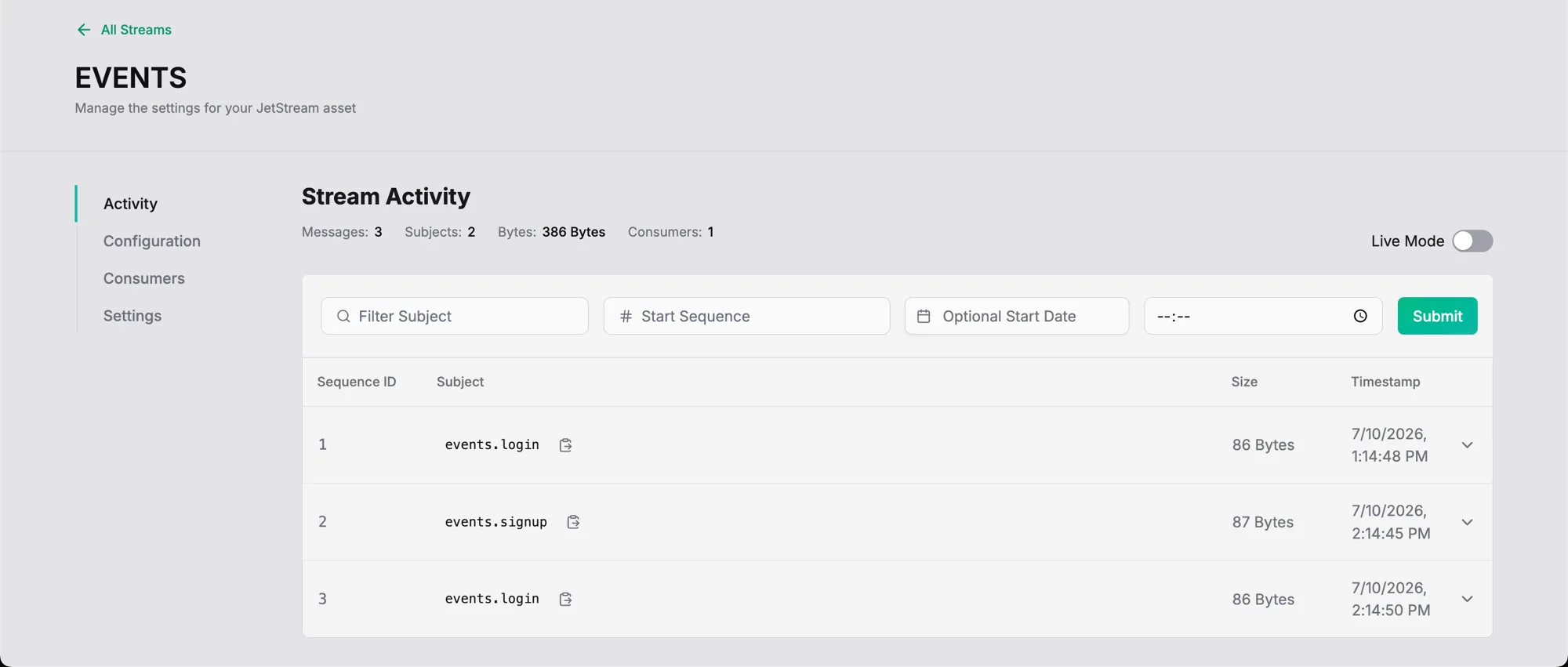
Once messages are flowing, you can watch the stream fill up from the Synadia Cloud UI — subjects, message counts, and per-message details, without touching the CLI.
Ingesting from JetStream
The setup above is fire-and-forget from ClickHouse’s perspective. If ClickHouse is down when a message is published, that message is gone. For a lot of analytics pipelines that’s acceptable. When it isn’t, JetStream is the answer.
JetStream persists messages in a stream and tracks per-consumer position, so a restarting subscriber resumes where it left off instead of losing whatever arrived in the gap. A durable pull consumer is what makes that guarantee stick across ClickHouse restarts.
Create the stream and the durable consumer with the NATS CLI before you create the ClickHouse table:
nats stream add EVENTS \  --subjects 'events.>' \  --storage file \  --retention limits \  --max-age 7d \  --replicas 3 \  --defaults
nats consumer add EVENTS clickhouse \  --pull \  --deliver all \  --ack explicit \  --max-deliver 5 \  --defaults
--replicas 3 keeps the stream available through node failures and rolling upgrades. On managed or multi-node NATS — including Synadia Cloud — a single-replica (R1) stream sits outside the availability guarantees and goes offline during cluster upgrades, which defeats the durability you added JetStream for. Use R1 only for local or single-node dev.
Then point a ClickHouse table at the stream and consumer. In the subscription → pump → store picture, this table is the subscription — a drop-in replacement for events_queue that reads from the durable consumer instead of subscribing directly. The pump and the store don’t change:
CREATE TABLE events_js_queue( event_time String, event_type String, user_id UInt64, payload String)ENGINE = NATSSETTINGS nats_url = 'nats://nats:4222', nats_subjects = 'events.>', nats_format = 'JSONEachRow', nats_stream = 'EVENTS', nats_consumer_name = 'clickhouse';Because the consumer is durable and tracks acknowledged messages on the NATS side, restarting ClickHouse or bouncing the table does not lose data. Messages published while ClickHouse was offline are delivered when it comes back, up to the stream’s retention limits. Attach a materialized view to events_js_queue — same shape as events_mv, same events destination — and the flow becomes NATS → EVENTS stream → events_js_queue → view → events, now with durability at the front.
JetStream also gives you replay. If you need to rebuild the destination table from scratch, you can create a new consumer with --deliver all and let ClickHouse re-ingest the stream from the beginning.
Verifying the pipeline
Publish a few messages:
nats pub events.signup '{"event_time":"2026-01-15T12:00:00Z","event_type":"signup","user_id":42,"payload":"{}"}'nats pub events.login '{"event_time":"2026-01-15T12:01:00Z","event_type":"login","user_id":42,"payload":"{}"}'nats pub events.login '{"event_time":"2026-01-15T12:02:00Z","event_type":"login","user_id":99,"payload":"{}"}'Query the destination:
SELECT event_type, count() AS nFROM eventsGROUP BY event_typeORDER BY n DESC;On the JetStream path, check consumer state from the NATS side:
nats consumer info EVENTS clickhouseThat shows delivered and acknowledged sequence numbers, pending message count, and redelivery counts. It’s the primary way to see how far the ClickHouse subscriber is behind the stream.
Production considerations
Authentication. The engine supports username/password (nats_username, nats_password), token (nats_token), and credentials file (nats_credential_file) authentication. TLS is enabled with nats_secure = 1. Prefer nats_credential_file over inline nats_password or nats_token: with a credentials file, the DDL holds only a file path and the secret material stays in the file on disk, out of system.tables and SHOW CREATE TABLE. Whichever method you use, keep the credential file readable only by the ClickHouse process.
Error handling. Set nats_handle_error_mode = 'stream' and the engine will surface unparseable messages through the _error and _raw_message virtual columns instead of failing the block. A second materialized view reading those columns into a dead-letter table is a good pattern. The _subject virtual column is useful when a single wildcard subscription needs subject-based routing in the view’s SELECT.
Skipping bad messages. nats_skip_broken_messages sets a tolerance for malformed messages per block before the engine gives up on the block. Combine it with stream error mode for a pipeline that stays alive under noisy input.
Batching. nats_max_block_size controls how many rows the engine buffers before flushing to the materialized view, and nats_flush_interval_ms sets the maximum time it will wait before flushing a partial block. Larger blocks are more efficient for MergeTree inserts. Shorter intervals lower end-to-end latency. Tune to the shape of your traffic.
Scale-out. Multiple ClickHouse instances can each declare a NATS engine table with the same nats_queue_group, and NATS will load-balance the subject across them. On the JetStream path, multiple ClickHouse instances sharing one durable pull consumer name achieves the same effect on the stream.
Where this pattern fits
NATS is already the transport for a lot of event-driven and edge systems: telemetry from device fleets, service-to-service events, IoT sensor streams, operational signals from short-lived workloads. The ClickHouse NATS engine turns any of those subjects into an analytics feed without adding a connector tier. The same subject that a control plane subscribes to for real-time reaction can feed a MergeTree table for time-series analytics, from one substrate, with one set of subjects and one set of ACLs.
As more workloads push toward the edge, and as autonomous agents produce more of the events flowing through these systems, the ability to route the same NATS subjects to both operational consumers and analytical stores from a single messaging layer stops being a convenience and starts being an architectural advantage. You keep one transport, one subject namespace, and one security model, and you get OLAP as a subscriber.
For managed NATS and JetStream with the operational side handled, see Synadia Cloud. For the underlying primitives, the JetStream documentation and the NATS CLI cover everything referenced above.
Want help from the NATS experts? Meet with our architects to get help tailored to your use case and environment.
Related posts
All posts