Mirror Streams in NATS JetStream: One-Way Replication Made Simple

Mirror streams in NATS JetStream give you one-way, asynchronous replication of stream data. Think of it like a one-way mirror—data flows in from a single origin stream, automatically and continuously. No complex synchronization, no manual syncing, no fuss.
The Problem
You’ve got a stream of data in one region, but consumers in another region need access to it. Or maybe you need to replicate data across NATS accounts. Or you just want a read-only replica to spread the load so you’re not hammering a single stream.
Mirror streams solve all of these. They give you a faithful, read-only copy of your origin stream that stays in sync automatically—even across unreliable network connections.
How It Works
- You create a stream with a mirror configuration pointing to the origin
- Messages automatically replicate from the origin to the mirror
- The mirror preserves original metadata—sequence numbers and timestamps stay the same
- Consumers on the mirror work exactly like consumers on any other stream
Configuration is all done on the receiving side. Your origin stream doesn’t need any special setup—it won’t even see a consumer created for the replication.
The mirror relationship is strict: each mirror can only replicate from a single origin stream, and mirrors are read-only. Clients can’t publish directly to them. But consumers have full capabilities, and you can still delete messages from the mirror independently if needed.
Mirror Configuration Options
When setting up a mirror, the only required field is the name of the origin stream. But you’ve got several optional parameters:
- Start Sequence — pick a starting sequence number if you don’t want to mirror from the beginning
- Start Time — same idea, but based on a timestamp
- Filter Subject — narrow replication to messages matching a specific subject pattern
- Subject Transforms — remap subject names as messages replicate
- Domain — specify which JetStream domain the origin stream lives in (useful for hub-and-leaf topologies)
One thing to note: you can’t use filter subject and subject transforms together—pick one.
When to Use Them
- Geographic distribution — spin up mirrors in different regions to bring data closer to consumers. One origin can feed multiple mirrors, perfect for fan-out topologies
- Cross-account replication — replicate data across different NATS accounts or domains
- Load distribution — enable
mirror_directso clients read from mirror replicas instead of routing back to the origin - Independent backups — since deletes don’t replicate, mirrors serve as independent copies of your data
What You Can’t Do
This is important to understand:
- Deletes don’t replicate in either direction. Delete a message from the origin, the mirror still has it. Delete from the mirror, the origin is unaffected. This is by design.
- Changes don’t flow backward. Mirrors are strictly one-way.
- Work queue retention has only partial mirror support and isn’t resilient over intermittent connections like leaf nodes.
- Interest-based retention is not supported with mirrors. The behavior is undefined—don’t try it.
Mirrors are generally tolerant of the origin being temporarily unreachable. When the connection drops, the mirror waits about 10–20 seconds before retrying.
CLI Examples
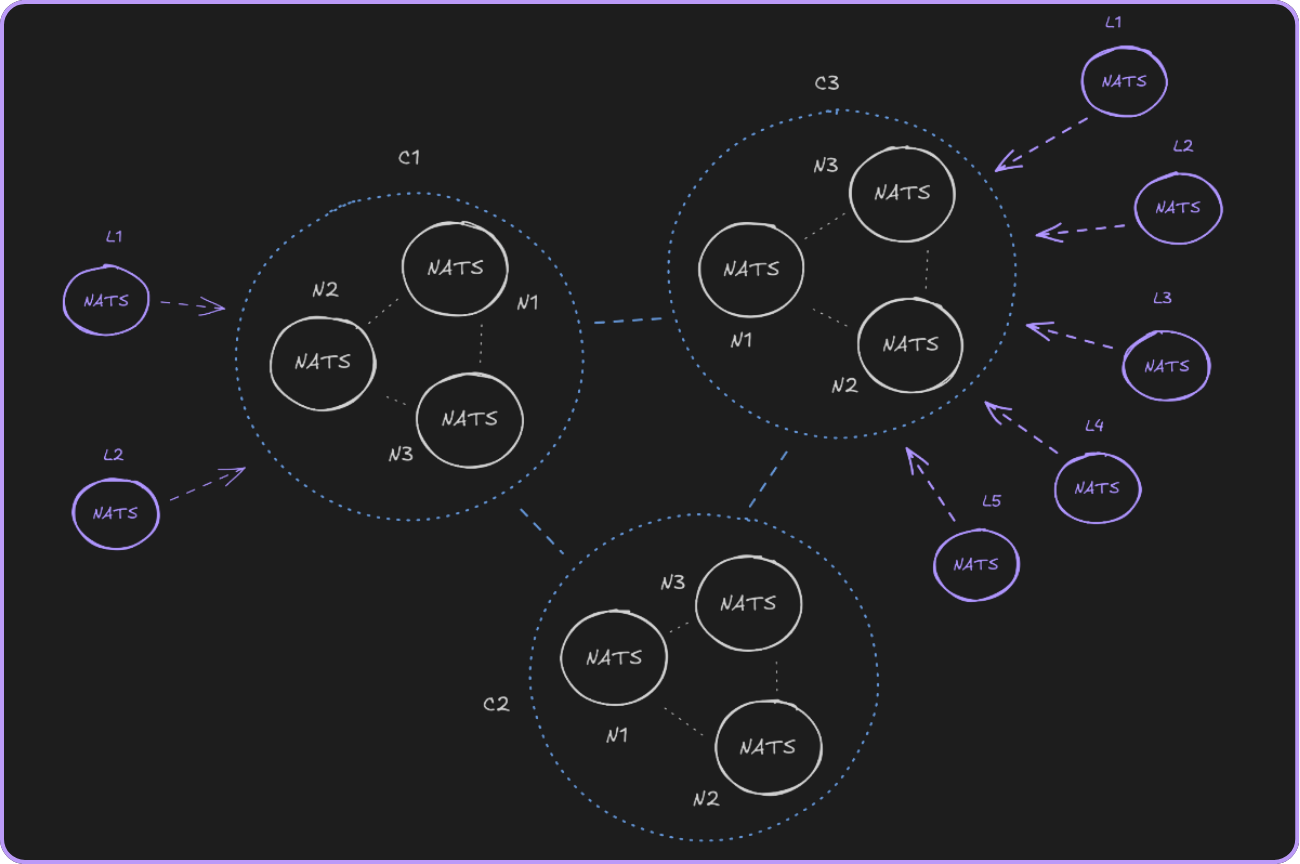
The cluster setup we use in this example.
Setup
Start by watching the stream report so you can see changes in real time:
watch nats str reportCreate a primary stream in cluster 1:
nats str add events \ --cluster c1 \ --subjects 'events.>' \ --defaultsCreate a mirror of that stream in cluster 2:
nats str add events2 \ --cluster c2 \ --mirror events \ --defaultsThe stream report will show both streams, with the mirror appearing in the replication section.
Publishing and Replicating
Publish some messages to the primary:
nats pub events.order '{"id": 1, "item": "widget"}'nats pub events.order '{"id": 2, "item": "gadget"}'nats pub events.order '{"id": 3, "item": "gizmo"}'Check the stream report—both streams should show three messages. Read the last message from the mirror to confirm:
nats str get events2 --last-for 'events.>'Mirrors Are Read-Only
Try publishing directly to the mirror—this fails because mirrors have no bound subjects and cannot accept direct publishes:
nats req events.order '{"id": 4, "item": "doohickey"}' -H Nats-Expected-Stream:events2Publish to the primary instead—this works:
nats req events.order '{"id": 4, "item": "doohickey"}' -H Nats-Expected-Stream:eventsMetadata Is Preserved
Compare the state of both streams:
nats str info events -j | jq '.state'nats str info events2 -j | jq '.state'Sequence numbers and timestamps match. The mirror is a faithful copy.
Deletes Are Independent
Delete a message from the origin:
nats str rmm events 2 --forceThe mirror still has it:
nats str get events2 2Delete a message from the mirror:
nats str rmm events2 1 --forceThe origin still has it:
nats str get events 1Deletes on one side don’t affect the other. This makes mirrors useful as independent backups.
Mirror Promotion (NATS 2.12)
NATS 2.12 introduced mirror promotion—if your origin stream goes down permanently, you can promote a mirror to become the new primary.
The process:
- Unbind subjects from the old primary so you don’t have two streams competing for the same subjects
- Remove the mirror configuration from the mirror and bind the subjects to it
- Once the promoted stream is healthy, clean up the old one
Keep in mind: the server won’t verify if the mirror is fully caught up, so any unreplicated messages will be lost.
Promotion Demo
Start a continuous publisher sending messages to the primary. Using nats bench ensures automatic retries on failed publishes:
nats bench js pub sync \ --stream events \ --multisubject \ --sleep 500ms 'events'Messages flow into the primary and replicate to the mirror in real time.
Now, unbind subjects from the primary by setting them to $devnull—a special placeholder that keeps the stream valid but stops it from accepting new publishes on the original subjects:
nats str edit events \ --subjects '$devnull' \ --forceThen promote the mirror by removing its mirror configuration and binding the original subjects:
nats str edit events2 \ --no-mirror \ --subjects 'events.>' \ --forceAnd just like that, events2 is now the new primary stream accepting writes directly. The publisher reconnects and messages start flowing into events2.
Note: there’s a brief window between unbinding the old primary and promoting the mirror where publishes will fail. Your clients need retry logic to handle this gracefully.
You can now clean up the old stream:
nats str rm events --forceGo Code Example
Here’s a Go program that demonstrates mirror streams end-to-end—replication, metadata preservation, read-only behavior, and independent deletes:
package main
import ( "context" "fmt" "log" "time"
"github.com/nats-io/nats.go" "github.com/nats-io/nats.go/jetstream")
func main() { nc, err := nats.Connect(nats.DefaultURL) if err != nil { log.Fatal(err) } defer nc.Close()
js, err := jetstream.New(nc) if err != nil { log.Fatal(err) }
ctx := context.Background()
// Clean up previous runs _ = js.DeleteStream(ctx, "EVENTS") _ = js.DeleteStream(ctx, "EVENTS_MIRROR")
// --- Setup --- fmt.Println("--- Setup ---")
_, err = js.CreateStream(ctx, jetstream.StreamConfig{ Name: "EVENTS", Subjects: []string{"events.>"}, }) if err != nil { log.Fatal(err) } fmt.Println("Created stream: EVENTS (subjects: events.>)")
_, err = js.CreateStream(ctx, jetstream.StreamConfig{ Name: "EVENTS_MIRROR", Mirror: &jetstream.StreamSource{ Name: "EVENTS", }, }) if err != nil { log.Fatal(err) } fmt.Println("Created mirror: EVENTS_MIRROR")
// --- Publish and Verify Replication --- fmt.Println("\n--- Replication ---")
for i := 1; i <= 5; i++ { ack, err := js.Publish(ctx, fmt.Sprintf("events.order.%d", i), fmt.Appendf(nil, `{"id": %d}`, i)) if err != nil { log.Fatal(err) } fmt.Printf(" Published seq %d to EVENTS\n", ack.Sequence) }
// Give the mirror time to replicate time.Sleep(time.Second)
mirror, err := js.Stream(ctx, "EVENTS_MIRROR") if err != nil { log.Fatal(err) }
fmt.Println(" Reading from mirror:") for seq := uint64(1); seq <= 5; seq++ { msg, err := mirror.GetMsg(ctx, seq) if err != nil { fmt.Printf(" seq %d — error: %v\n", seq, err) continue } fmt.Printf(" seq %d — %s — %s\n", msg.Sequence, msg.Subject, string(msg.Data)) }
// --- Metadata Preservation --- fmt.Println("\n--- Metadata Preservation ---")
primary, err := js.Stream(ctx, "EVENTS") if err != nil { log.Fatal(err) }
for seq := uint64(1); seq <= 3; seq++ { pMsg, _ := primary.GetMsg(ctx, seq) mMsg, _ := mirror.GetMsg(ctx, seq) fmt.Printf(" Seq %d — primary: %s | mirror: %s | match: %v\n", seq, pMsg.Time.Format(time.RFC3339Nano), mMsg.Time.Format(time.RFC3339Nano), pMsg.Time.Equal(mMsg.Time)) }
// --- Read-Only --- fmt.Println("\n--- Read-Only ---")
mirrorInfo, _ := mirror.Info(ctx) fmt.Printf(" Mirror subjects: %v (empty — clients can't publish directly)\n", mirrorInfo.Config.Subjects)
// --- Delete Behavior --- fmt.Println("\n--- Delete Behavior ---")
fmt.Println(" Deleting seq 2 from primary...") if err := primary.DeleteMsg(ctx, 2); err != nil { log.Fatal(err) }
_, err = primary.GetMsg(ctx, 2) fmt.Printf(" Primary seq 2: %s\n", status(err))
_, err = mirror.GetMsg(ctx, 2) fmt.Printf(" Mirror seq 2: %s\n", status(err))
fmt.Println("\nDone.")}
func status(err error) string { if err != nil { return "deleted" } return "still present"}Wrapping Up
Mirror streams are your go-to for one-way replication of JetStream data—across regions, accounts, or unreliable networks—without the complexity of full synchronization. Just remember: they’re read-only, deletes don’t replicate in either direction, and they work best with standard retention policies.
And with mirror promotion in NATS 2.12, you’ve got a clean failover path if your origin ever goes down for good.
We’re building the future of NATS at Synadia. Want more content like this? Subscribe to our newsletter
Related posts
All posts