Scaling Dynamic Dashboard Subscriptions with JetStream and Core NATS

A common community question is how to model a dashboard where each user watches a dynamic, overlapping set of subject filters over a large JetStream-backed data set.
For example: one stream contains thousands of unique subjects, millions of messages per day, and dashboards may create per-user filters such as 10–20 wildcard subject patterns. Each user needs an initial snapshot of the latest value for the subjects they care about, then live updates as new values arrive.
The short answer: use JetStream for durable state and snapshot reads, and use core NATS subscriptions for live fan-out whenever possible. Keeping a long-lived JetStream consumer per dashboard user can work for a proof of concept, but it is usually not the first design to scale.
Why per-user JetStream consumers can become expensive
JetStream consumers are server-side resources. They track delivery state, pending messages, acknowledgements, redelivery behavior, and filter configuration. Ephemeral consumers reduce lifecycle management compared with durable consumers, but an active ephemeral consumer still has work to do while it exists.
If you have 1,000 dashboard users, each with 10–20 highly overlapping wildcard filters, a design based on active per-user JetStream pull consumers can create several scaling concerns:
- Many consumers may scan or deliver overlapping portions of the same stream.
- Each consumer has its own server-side state.
- Pull and ack behavior can add load beyond simple pub/sub fan-out.
- Dynamic filters make it harder to reuse consumers across users.
- Initial snapshot reads and live update reads have very different access patterns.
That does not mean the model cannot work. It means the answer depends on message rate, subject cardinality, filter selectivity, replicas, storage, client fetch cadence, acknowledgement policy, and hardware. For a proof of concept, test it directly. For a production design, consider separating snapshot retrieval from live delivery.
A more scalable shape: snapshot from JetStream, live updates from core NATS
A common pattern is:
- Publish updates on normal NATS subjects.
- Persist those updates in JetStream so the latest state can be recovered.
- Use a short-lived JetStream consumer to build a user’s initial snapshot.
- Delete or stop using that consumer once the snapshot is complete.
- Use core NATS subscriptions for ongoing live updates.
This keeps JetStream focused on persistence and replay, while core NATS handles the real-time fan-out path.
Core NATS subscriptions are intentionally lightweight. If a dashboard user needs 20 wildcard filters, creating 20 core subscriptions for that user is often a better scaling shape than keeping one active JetStream consumer per user. You should still load test your expected user count and filter count, but core NATS is the part of the system designed for high-throughput pub/sub fan-out.
Store only the latest value when that is all the dashboard needs
For odds, prices, status, presence, and similar monitoring use cases, the dashboard often needs the latest value per market or instrument, not every historical update.
If that matches your requirement, configure the stream so it retains only a bounded number of messages per subject. In JetStream configuration this is commonly done with MaxMsgsPerSubject. Setting that value to 1 means the stream keeps the latest message for each subject, subject to the rest of your stream limits and retention configuration.
Conceptually:
odds.sport.league.market.selection -> latest known oddsWith that model, an initial dashboard load can query JetStream for the latest values matching the user’s subject filters instead of replaying the full history of odds changes.
Where supported by your server and client version, a consumer deliver policy for the latest message per subject can also be useful for snapshot-style reads. Check the JetStream consumer options available in your client library and validate the behavior with your exact stream configuration.
Use short-lived ephemeral consumers for snapshots
For the snapshot phase, create an ephemeral pull consumer scoped to the user’s requested filter or filters, fetch the initial data, then remove the consumer or let it go away when no longer needed.
One prerequisite to confirm first: carrying more than one subject filter on a single JetStream consumer requires a reasonably recent NATS server, since multiple filter subjects on one consumer were introduced in NATS server 2.10. On older servers a consumer accepts only a single filter subject, so a user with many distinct filters would need either a separate consumer per filter or one broader filter that the application narrows further. If you plan to build a snapshot for 10–20 filters with a single consumer, verify your server version supports it.
The goal is to avoid keeping snapshot-specific JetStream state around for the entire dashboard session.
A practical flow looks like this:
User opens dashboard -> determine requested subject filters -> create ephemeral JetStream consumer for snapshot -> fetch latest retained values matching those filters -> render initial dashboard state -> stop/delete snapshot consumer -> subscribe with core NATS for live updatesThis approach also makes it easier to tune the expensive path. Snapshot reads happen at user connect time or when the filter set changes. Live updates use normal NATS subscriptions.
How core NATS handles multiple wildcard filters
A core NATS subscription is made to a subject pattern. If a user has 10–20 wildcard filters, expect to create 10–20 subscriptions and route them to the same application handler or channel.
For example, conceptually:
subscribe odds.tennis.>subscribe odds.football.premier.*subscribe odds.basketball.nba.>Some tools may accept multiple subjects in one command-line invocation, but client APIs commonly model these as separate subscriptions internally. In a .NET application, plan around one subscription per subject filter unless the specific API you are using documents a different abstraction.
That is usually acceptable. The important comparison is not “one subscription versus many subscriptions”; it is lightweight core NATS subscriptions versus stateful JetStream consumers for live fan-out.
Where JetStream republish fits
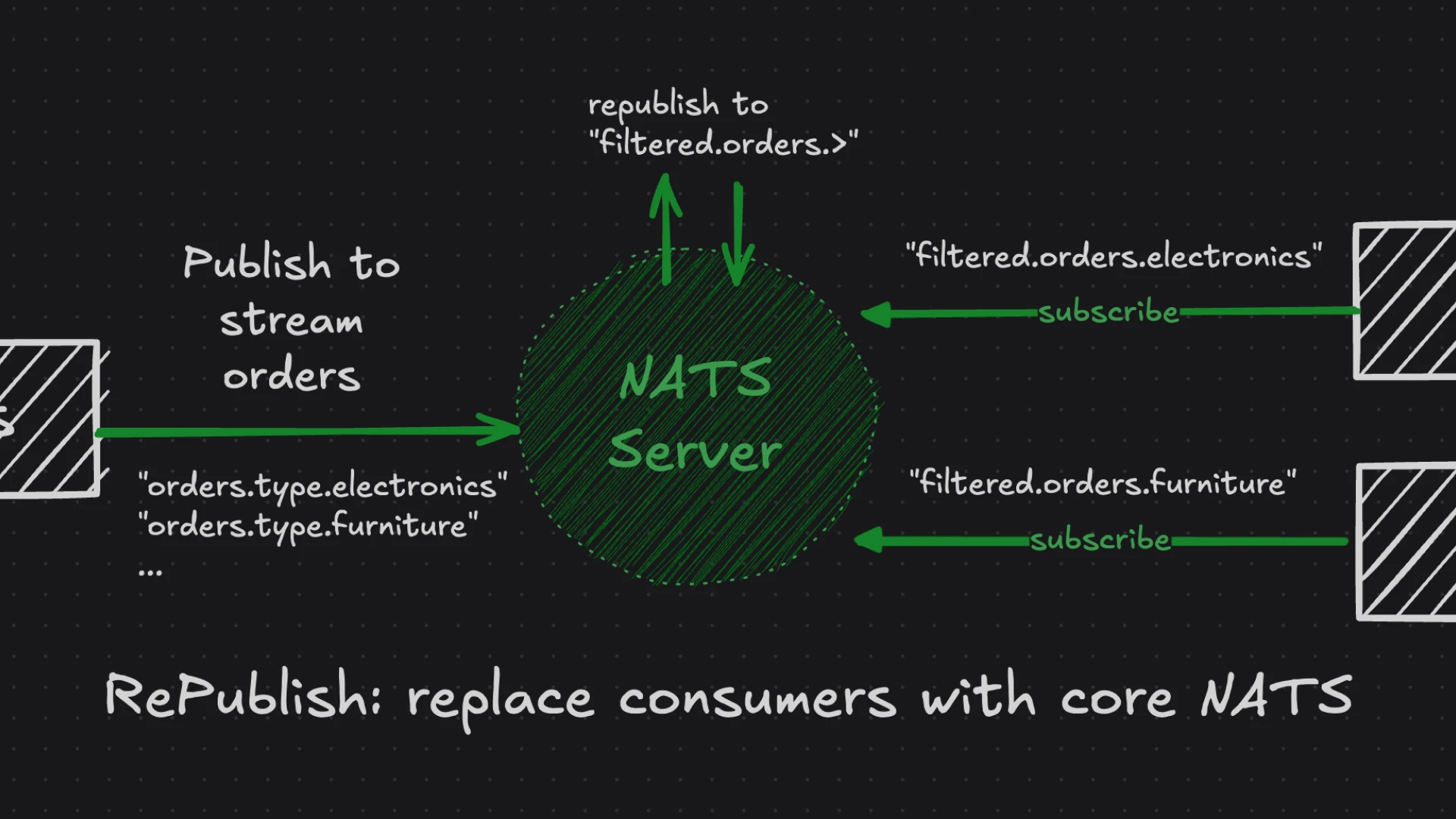
JetStream republish can be useful when you want messages persisted to a stream and then emitted again onto core NATS subjects for subscribers.
In this design, republish can help separate the durable ingest path from the live subscription path:
Publisher -> JetStream stream stores update -> republish emits update onto live subject -> dashboard core NATS subscribers receive updateHowever, republish does not eliminate the need for user-level filtering. If each dashboard user has dynamic wildcard filters, those filters still belong in the subscriptions the dashboard service or client creates. Republish is a stream-level routing tool, not a per-user dynamic query engine.
Whether you need republish depends on your ingest topology:
- If publishers already publish on the live subjects that dashboards can subscribe to, you may not need republish.
- If you want dashboards to consume only after JetStream persistence, republish can be a useful bridge back to core NATS.
- If you need transformed destination subjects, review the republish options supported by your NATS server version.
What to load test
Before deciding whether 1,000 users is safe for your environment, test the specific shape you plan to run.
Useful measurements include:
- Number of unique subjects in the stream.
- Average and peak publish rate.
- Number of retained messages per subject.
- Number of connected dashboard users.
- Number of wildcard filters per user.
- Degree of overlap between users’ filters.
- Snapshot frequency, especially during reconnect storms.
- Number of active JetStream consumers at steady state.
- Core NATS subscription count at steady state.
- End-to-end update latency under peak load.
- Server CPU, memory, storage I/O, and network usage.
Also test operational events:
- A large group of users connecting at once.
- Users changing filters frequently.
- Client reconnects.
- Slow dashboard clients.
- Stream limits being reached.
- Server restart or cluster failover if you run clustered JetStream.
The right answer is workload-dependent, and these tests will reveal whether the bottleneck is snapshot reads, live fan-out, storage, client behavior, or subject/filter design.
Practical recommendation
For a dashboard that needs an initial latest-value snapshot and then live updates:
- Use JetStream to store the recoverable state.
- Use
MaxMsgsPerSubjectwhen only the latest value per subject is required. - Use ephemeral JetStream consumers for short-lived snapshot reads.
- Avoid keeping one active JetStream consumer per user for the live path unless you have tested and accepted that cost.
- Use core NATS subscriptions for live updates.
- Create one core subscription per wildcard filter when your client API requires it.
- Consider JetStream republish when you want persisted updates emitted back onto live NATS subjects.
This keeps each part of NATS doing the job it is best suited for: JetStream for persistence and replay, core NATS for low-overhead real-time fan-out.
Want help from the NATS experts? Meet with our architects to get help tailored to your use case and environment.
Related posts
All posts